

Try the christmas collage maker
How to make a Christmas photo collage
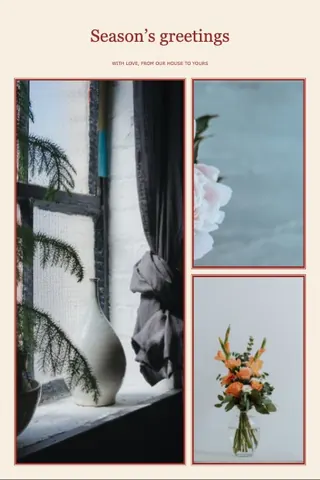
Open a Christmas collage template — Merry & bright, Home for the holidays or Christmas card — preview it with your photos and apply it. Change the greeting in Style, then add seasonal stickers such as pine trees, holly, snowflakes and candy canes, or the Christmas cheer sticker set. The Christmas card template uses the 4×6 print size, so it prints as a real card.
Price: Free — no account, no watermark, nothing to buy.
- Three Christmas collage templates
- Pine, holly and snowflake stickers
- Printable 4×6 card

Make a Christmas collage in four steps
- Pick red, green or paperMerry & bright is deep red, Home for the holidays is evergreen, Christmas card is warm paper sized 4×6.
- Add the year’s best photosThe Christmas collage adapts to how many you add, from two to thirty.
- Write the greeting and namesChange the title and subtitle in Style, for example “Merry Christmas from the Parkers”.
- Send or printShare the Christmas collage in a message, or print the 4×6 card at home or at a photo shop.
Christmas card or photo collage?
For a card you will print, start with the Christmas card template, which is sized 4×6 inches. For sharing online, Merry & bright and Home for the holidays use a 4:5 portrait size.
Why send a Christmas collage
A Christmas collage fits a whole year of family moments on one card. Send the Christmas collage by message, or print it for relatives who keep cards on the shelf.
Photo ideas
- Everyone by the tree, plus one outtake where someone is laughing.
- A winter walk, a baking afternoon or matching pajamas.
- A “year in photos” card with one picture from each season.
Greeting ideas
“Merry Christmas from the Parkers”, “Season’s greetings”, “Home for the holidays” or “Our year in photos”. Short greetings read best when a Christmas collage is viewed on a phone.
Printing tips
Choose the largest download size and check the 300 DPI note in the download window. See the print size guide for pixel sizes.
Christmas card with several photos
The Christmas card template is a 4×6 card with one large photo, smaller photos beside it and a greeting. Three or four photos read best at that size; Merry & bright and Home for the holidays are 4:5 and suit a larger set. At 3000 pixels the 4×6 card is about 500 DPI, more than the 300 DPI a print needs, so you can print it at home or at a photo shop.
Christmas collage maker questions
Still stuck? Email support@collagemaker.org.
Is there a Christmas card template?
Yes. The Christmas card template is sized 4×6 inches, with room for three photos and a greeting.
Where are the Christmas stickers?
For your Christmas collage, open Stickers and choose Seasonal for pine trees, holly, snowflakes, ornaments, mittens and candy canes. The Christmas cheer set adds three matching stickers at once.
Can I print my Christmas collage?
Yes. Download at the largest size and print the Christmas collage card at 4×6 inches.
What should I write on a Christmas photo card?
A short greeting and your names work best, for example “Merry Christmas from the Parkers” or “Love, Sam and Alex”. Add the year in the subtitle if you send a card every year.
Can I make a Christmas card with several photos for free?
Yes. The Christmas card template is a 4×6 card with a large photo, smaller photos beside it and a greeting; three or four photos read best. For a bigger set, choose Merry & bright or Home for the holidays. It is free, with no watermark and no sign-up.
Is there a free holiday photo collage maker?
Yes. The Christmas collage maker is a free holiday photo collage maker: festive templates, seasonal stickers and your own greeting, with no watermark and no account.
How do I print a Christmas photo card at home?
Download the Christmas card template at the largest size, then print it at 4×6 inches. At 3000 pixels it is about 500 DPI.
 Fall collage maker
 Birthday collage maker
 Printable collage maker
 Love collage maker
 Facebook cover collage maker