Try the collage on instagram story






Six photos, the most that Instagram’s Layout holds. This page takes up to 30.
The short answer
To make a collage on Instagram Story inside the app, tap Create, tap Story, then tap Layout on the left and fill the grid. Layout holds up to 6 photos. For more photos or exact placement, build a 9:16 image on this page, save it to your phone and post it as one Story. This page opens at the Story size with the top and bottom bands marked, and it keeps every photo whole.
Price: Free — no account, no watermark, nothing to buy.
- Opens at the 9:16 Story size
- Top and bottom bands marked
- Up to 30 photos, nothing cropped

Build a Story collage on this page
- Add your photosThis page is already set to Story 9:16. Add 2 to 30 photos.
- Check the dashed bandsThey mark where the profile bar and reply bar usually sit. Keep faces and words out of them. The bands never appear in your download.
- Tap DownloadA 1688 × 3000 JPG is prepared for you, with no watermark. On a phone, tap Save or share, then Save Image.
- Post it from InstagramTap Create, then Story, then the gallery icon, and pick your collage from the camera roll.
How to make a collage on Instagram Story in the app
Instagram has three built-in ways, and each suits a different job.
| Way | Photos | What you control | Where to find it |
|---|---|---|---|
| Layout | Up to 6 | The grid style | Create, Story, then Layout on the left |
| Collage | 5 or more | Instagram arranges and animates them with AI | Stories camera: select several photos from your gallery and look for Collage |
| Photo sticker | One at a time, over a background | Position, size and overlap | Sticker tray, then the photo sticker |
Source: Instagram blog, “How to use Instagram Stories: The complete 2026 guide”, and Instagram Help Center, read November 5, 2026.
Layout
- Open Instagram and tap Create.
- Tap Story at the bottom, then Layout on the left.
- Tap the grid icon to change the layout.
- Take a photo or add one from your camera roll for each panel.
- Approve the result and finish your Story.
Instagram’s help page lists Layout for its iPhone and Android apps. It is the quickest way to get a neat grid from a handful of photos.
Collage
Instagram calls this an AI-powered tool. Pick 5 or more photos from your gallery in the Stories camera, and it arranges them with movement. Choose this when you want a moving result and are happy to let Instagram decide the arrangement.
Photo sticker
Start a Story with any background, open the sticker tray and tap the photo sticker. Each photo lands on top of the last one, and you drag and pinch it into place. This gives the most freedom and takes the most taps, because you add photos one by one.
When to build a collage on Instagram Story outside the app
- More than 6 photos in a tidy arrangement. This page takes up to 30.
- Every photo whole. Best fit gives each photo a frame in its own shape.
- Working on a computer. Build the collage in any browser, then send it to your phone.
- Using it again. The finished image stays in your camera roll for a post, a message or next year.
- Exact words and fonts. Add a title in Style or movable text in Text & decor, with 12 fonts to choose from.
The safe area in pixels
Meta’s guidance for Story ads is to keep about the top 14% and bottom 20% free of text, logos and other key elements, so nothing sits under the buttons. Source: Instagram Help Center, “Boost an Instagram story”, read November 5, 2026. Here is that guidance worked out for three sizes:
| Story size | Top band (14%) | Bottom band (20%) | Clear middle |
|---|---|---|---|
| 1080 × 1920 | 269 px | 384 px | 1267 px |
| 1688 × 3000 (this page, default) | 420 px | 600 px | 1980 px |
| 2304 × 4096 (this page, largest) | 573 px | 819 px | 2704 px |
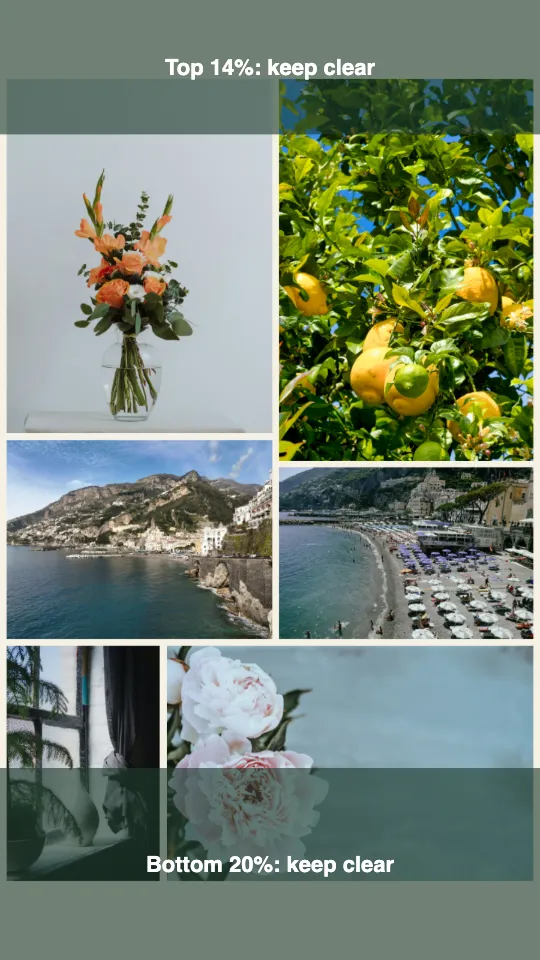
The dashed bands in the editor sit a little tighter, at about the top 11.5% and bottom 12.5%, because an everyday Story has a profile bar and a reply bar and no ad button. If you plan to boost the Story, use the larger numbers in the table.
How many photos fit in a collage on Instagram Story?
We ran a mixed set through the layout code this page uses: alternating 3:4 and 4:3 phone photos, Best fit, default spacing, at 1080 × 1920. Calculated November 5, 2026.
| Photos | Photos fill the Story | Short side of the smallest photo |
|---|---|---|
| 2 | 81.9% | 677 px |
| 3 | 94.1% | 370 px |
| 4 | 82.7% | 302 px |
| 6 | 81.0% | 354 px |
| 9 | 92.6% | 271 px |
| 12 | 90.9% | 225 px |
| 16 | 91.5% | 134 px |
| 20 | 89.0% | 141 px |
| 30 | 88.1% | 109 px |
Up to 12 photos, even the smallest one is about a fifth of the screen width. From 16 photos it drops to about an eighth, and a face that small is hard to recognize on a phone. Our advice: put 12 or fewer on one Story and split a bigger set across two. Three photos make the fullest Story in this set, at 94.1%.
Story or post?
A Story lasts 24 hours unless you save it to Highlights, and it fills the screen at 9:16. A collage you want to keep on your profile belongs in a post, at 1:1 or 4:5. The Instagram collage maker opens at the post sizes, and the iPhone guide covers saving to Photos.
Collage on Instagram Story questions
Still stuck? Email support@collagemaker.org.
How many photos can you put in a collage on Instagram Story?
Layout holds up to 6 photos, and Collage starts at 5 or more, according to Instagram. On this page you can place up to 30, and we suggest 12 or fewer so each photo stays readable on a phone.
How do you put multiple photos on one Instagram Story?
Use Layout for a grid, Collage for an animated arrangement or the photo sticker to layer photos by hand. You can also build a single 9:16 image here and post it as one Story.
How do you layer photos on an Instagram Story?
Start a Story with any background, open the sticker tray and tap the photo sticker. Repeat for each photo, then drag and pinch them into place.
What size should an Instagram Story collage be?
Use a 9:16 shape, such as 1080 × 1920. This page downloads 1688 × 3000 by default and up to 2304 × 4096, all at 9:16, so the collage fills the screen.
Where should I keep text on a Story collage?
Keep words and faces in the middle. Meta’s guidance for Story ads is to leave about the top 14% and bottom 20% clear, which is 269 and 384 pixels on a 1080 × 1920 image.
Can I make a collage on Instagram Story from a computer?
Yes. Instagram lists Layout for its phone apps, and this page works in any browser. Build the collage on your computer, send the file to your phone and post it from there.
Is this Instagram Story collage free?
Yes. It is free, with no account, no watermark and nothing to buy. Photos are processed in your browser and are not uploaded.
 Instagram collage maker
 Collage on iPhone
 Wallpaper collage maker