Try the polaroid collage maker


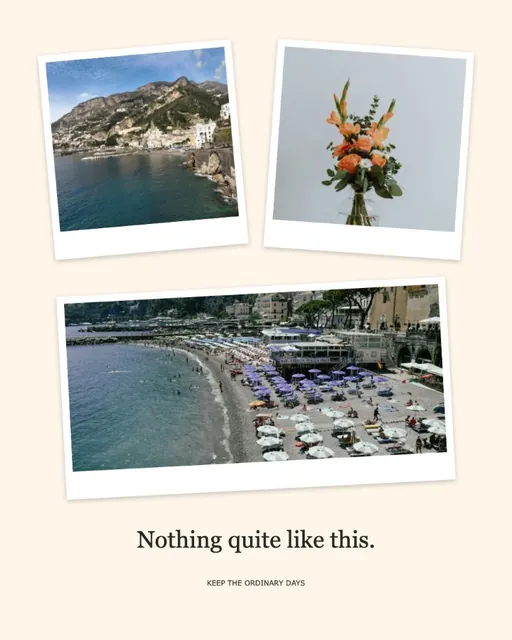
A Polaroid collage: white frames with a deeper bottom edge.
How to make a Polaroid collage
Add your photos and your Polaroid collage opens in white instant-photo frames with a deeper bottom edge and a soft shadow. Pick a template such as Weekend Polaroids or Pocket memories, tap Film for dark film edges, or Photo booth strip for a tall vertical strip. In Freeform you can tilt and overlap each print, then add tape or doodles on top.
- Polaroid collage with white instant-photo frames
- Film edges or a photo booth strip
- Tilt and overlap in Freeform
Make a Polaroid collage in four steps
- Pick a few favoritesThree to six photos feel most like a handful of instant prints; each one opens in a white frame.
- Choose the film lookTap Polaroid for white borders, Film for dark sprocket edges, or Photo booth strip for a tall strip.
- Scatter the printsSwitch to Freeform and rotate each print a few degrees so the Polaroid collage feels handmade.
- Save your printsKeep the soft shadow on for a lifted look, then save the Polaroid collage as a PNG or JPG.
Polaroid, film or photo booth?
Polaroid frames add a white border with a deeper bottom edge, like an instant photo. Film frames add dark edges for a contact-sheet look. Photo booth strip stacks photos in a tall 9:16 strip.
Why make a Polaroid collage
A Polaroid collage gives phone photos the warmth of instant prints, which suits a party, a trip or a friendship post. A Polaroid collage also prints well on 4×6 paper.
A scattered, handmade look
Switch to Freeform to rotate each print a little, overlap them and add washi tape or doodle stickers.
Printing instant-photo style
For a printed Polaroid collage, choose a paper size on the printable collage maker and keep the same frames.
Polaroid collage maker questions
Still stuck? Email support@collagemaker.org.
Is this an official Polaroid product?
No. Polaroid is a trademark of its owner. This tool adds instant-photo style frames to your own photos.
Can I tilt the photos in a Polaroid collage?
Yes. Switch to Freeform to move, rotate and overlap each photo.
Can I make a photo booth strip?
Yes. Tap Photo booth strip to stack photos in a tall 9:16 layout, or pick the Photo booth template.
How do I make it look more like real instant photos?
Keep the Polaroid frame, choose a warm cream background and raise Shadow in Frames so each print lifts off the page. Slight angles in Freeform help too.
 Aesthetic collage maker
 Printable collage maker
 Love collage maker
 Birthday collage maker
Shake it like an instant photo.
White frames, film edges or a photo booth strip.